

-
 My Stable
 -
 Showing
 -
 Advanced Facilities
 -
 Community
 -
 Upgrade
 -
 Resources
X
No store required
Add to your home screen
Get a sleek, app-like experience without visiting your browser every time.
Instant access
Launch straight from your home screen — no browser needed
Full screen gameplay
Runs minimal browser chrome, giving you more screen space
Add to your home screen
How to set it up in Safari:
1
Tap the Share button at the bottom of your screen
2
Scroll down and tap Add to Home Screen
3
Tap Add in the top-right corner
Add to your desktop
Install the game as an app for quicker access and a cleaner experience.
Instant access
Launch from your taskbar or desktop — no browser tab hunting
Its own window
Runs in a dedicated window with minimal browser chrome cluttering the UI
HGG Community Forums
Log In to HorseGeneticsGame
HGG Community Forums
Join our discord server!
Howdy, Stranger!
It looks like you're new here. If you want to get involved, click one of these buttons!
Categories
- All Discussions93,074
- Announcements1,227
- HJ2 Discussion90,058
- ↳ New Member Introductions70
- ↳ Help me out5,800
- ↳ Horses For Sale and Auction21,229
- ↳ Breeding Ads and Sales6,437
- ↳ Herd Helper42,329
- ↳ Bug Discussion39
- ↳ Repair Log12
- ↳ New User Experience87
- General Discussion1,789
- ↳ Saddle Sisterhood288
- ↳ Games, Contests and GiveAWays353
- ↳ Genetics409
In this Discussion
- Ammit December 2025
- kitinaround December 2025
- RoseFlute December 2025
Festival Updates to templates for breeds, manes and tails.
-
Every year for the winter festival we like to work on a special extra high effort project to improve the quality of life for our members. This year our focus was on the template system.
If you have not used templates before here is how you create one.
1) Open a horse page
2) Go to the tack tab
3) Start the editor
4) Tack up your horse how you want it to look
5) Click the "Templates" button above your horse's image and then "save templates".
6) You can set a name for this template and also state if you want the background, mane and tail items to save as part of this template.
Templates can be added to other horses using the bulk editor in the barn page, or from the horse page by opening the tack editor.
Mane and tail update.
You can now edit the manes and tails of all horses in the game regardless of the BC. Right now the options only include the tack item manes and tails that were designed for the national horses but we are working making all the manes and tails from all the BCs available. Importantly you can now reposition things to the far side of the body, change the angles, sizes etc.
These changes can be saved in a template. Keep in mind that if you apply this template to a different BC than the one you created it on it might look a bit odd.
Assign a default template for your breed
On the Manage My Breeds page in the Breed Art tab, premium members can now assign a default template. This does not update existing horses of the breed (to keep the system from accidentally destroying tack already on your horses) but every horse you create or breed of that breed will have that template.
You can set different templates for light, medium and heavy bone horses.
Please note that the template system still struggles some with layering some times, and very complex templates may not copy over well. I recommend doing some testing/ playing with things to get something that works well for you. Simpler templates are going to do better here.Need to contact me? Read this first. Only send me a PM for PayPal issues or if I ask you to. Otherwise, make a forum post. You will get a better faster answer by making a post.
I sometimes get busy and miss things. If your private message, question, etc. gets missed please ping me so I can follow up with you. I am also always happy to explain or clarify. (HAJ does not have a customer service email, please send me a forum message! )
she/her -
Oh my goodness thank you I cannot wait use this I absolutely love doing a little bit of decorating on the horses I create and the ones I get but so helpful I just figured there would never be a way to get those changed over thank youThanked by 1Ammit
-
I accidentally moved my PRE mane and now there's a creature on horseback, marauding! Look out!
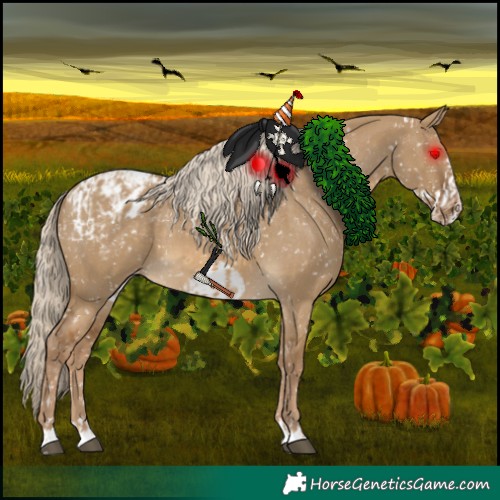
xExPro MudBath -
This is so fun!Need to contact me? Read this first. Only send me a PM for PayPal issues or if I ask you to. Otherwise, make a forum post. You will get a better faster answer by making a post.
I sometimes get busy and miss things. If your private message, question, etc. gets missed please ping me so I can follow up with you. I am also always happy to explain or clarify. (HAJ does not have a customer service email, please send me a forum message! )
she/herThanked by 1RoseFlute

Join our discord server!
 News & Alerts
8/30/2026 12:10 AM EST
New Derby Day!
The Outer Space Dress-Up Derby is accepting entries until the end of the week.8/26/2026 2:20 AM EST
Were you a fan of the old satin gene appearance? You can now add it as a tack item. "Original Satin Shimmer" can now be found in the "Luster Dust 1" tackpack.
8/23/2026 12:10 AM EST
New Derby Day!
The Trail Ride Dress-Up Derby is accepting entries until the end of the week.8/21/2026 12:56 AM EST
Introducing the Shape Primitives tack pack. This collection contains lots of color changeable basic shapes to help you bring your designs to life. Unlockable now on the "Tack Pack Manager" page.

8/18/2026 1:54 PM EST
The game has been experiencing occasional bursts of DDoS traffic, which have caused short outages over the past couple of months.
We’re working to mitigate the issue, but it’s still a work in progress. There may be additional outages, and you might notice some unusual behavior while we test different solutions. For example, you may encounter more Cloudflare verification pages or temporarily find yourself locked out of the forums.
Thanks for your patience while we work through this.
We’re working to mitigate the issue, but it’s still a work in progress. There may be additional outages, and you might notice some unusual behavior while we test different solutions. For example, you may encounter more Cloudflare verification pages or temporarily find yourself locked out of the forums.
Thanks for your patience while we work through this.
 Bonus Stall Progress
0%